
Government Resume Template
Government Resume Template · Built for FPSC, PPSC and departmental applications
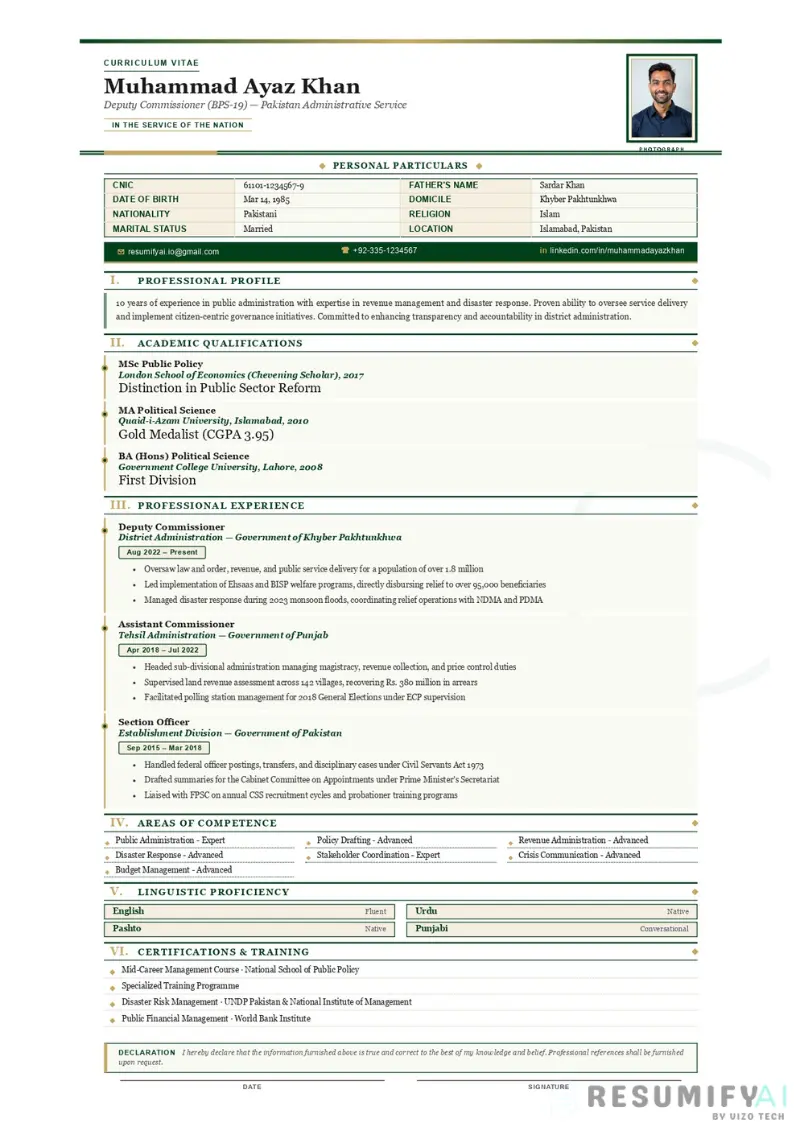
Built for Pakistani candidates applying to federal and provincial government posts. This template carries the three things a government recruitment file is expected to contain and that modern CV designs leave out: a Personal Particulars table with CNIC, Father's Name and Domicile, a formal Declaration, and a signature and date block.
The document is set in Georgia serif on A4, in Pakistan green and gold, with section rules and a formal register. It reads like an official record rather than a marketing document, which is exactly how a selection committee expects a government CV to look.
Who this template is for
This template is designed for Pakistani candidates whose application will sit in a government file. Pick this template if you are:
- Applying through the Federal Public Service Commission (FPSC) or a provincial commission: PPSC in Punjab, SPSC in Sindh, KPPSC in Khyber Pakhtunkhwa, BPSC in Balochistan, or AJKPSC
- Applying to a departmental post advertised directly by a ministry, directorate or district administration
- Sitting a recruitment test conducted by NTS, PTS, OTS or a similar testing service that asks for a CV alongside the form
- Applying to an autonomous body or public sector organisation such as WAPDA, NADRA, Pakistan Railways, a power distribution company, or a provincial development authority
- Applying for a teaching post in a government school or college, or for a position in the health, revenue, police or education departments
- A contract or daily wage employee applying for regularisation or for a higher scale post
- Already in government service and applying for promotion or a departmental transfer where a formal CV is required
This template is not meant for private sector or overseas applications. A Declaration block, a signature line and a CNIC field look out of place to a corporate recruiter and can slow down automated screening. For private jobs in Pakistan use the Classic or ATS Friendly template, and for the Middle East use the Gulf Professional template.
Why this template works for government applications
A Personal Particulars table, not a scattered list
CNIC, Father's Name, Date of Birth, Domicile, Nationality, Religion, Marital Status and Location sit in a bordered two column table directly under the header. Government application files record these fields in a fixed order, and presenting them the same way means a clerk or committee member can verify your form against your CV without hunting through paragraphs.
Domicile is a field, not a footnote
Recruitment to many federal and provincial posts is allocated against regional and provincial quotas, so domicile is one of the first things checked. This template gives it a labelled row of its own instead of burying it in an address line.
The Declaration is already written
The template includes the standard declaration: that the information furnished is true and correct to the best of your knowledge and belief, and that references will be furnished on request. It sits in a bordered box in Pakistan green with a gold rule, followed by Date and Signature lines. Many departmental files expect a signed CV, and a candidate who submits one without a declaration can be asked to resubmit.
Section names in the official register
Sections are titled Professional Profile, Academic Qualifications, Professional Experience, Areas of Competence, Linguistic Proficiency, and Certifications and Training. This is the vocabulary of government documentation. "Skills" and "About Me" read as informal in a selection file.
Built to print, because it will be printed
Government applications are still largely a paper process. The layout is fixed to A4 with 10mm top and bottom margins, uses Georgia serif at print-legible sizes, and keeps headings with the content that follows so sections do not break across pages. What you see on screen is what lands in the file.
What is included in this template
- Formal document header carrying the label Curriculum Vitae, your name, your post title and the line "In the Service of the Nation"
- Optional framed photograph at the top right, which you can leave out if the advertisement does not ask for one
- Personal Particulars table with CNIC, Father's Name, Date of Birth, Domicile, Nationality, Religion, Marital Status and Location
- Contact bar for email, phone and LinkedIn
- Professional Profile section for your summary
- Academic Qualifications section
- Professional Experience section
- Areas of Competence, laid out as a grid
- Linguistic Proficiency section
- Certifications and Training section
- Declaration box with the standard wording, followed by Date and Signature lines
- Pakistan green and gold colour scheme with Georgia serif throughout, fixed to A4
- Watermark on the Free plan. Full template access on Basic at PKR 1,499 one time, or Pro at PKR 4,999 per month
How to write a strong government CV using this template
A government CV is checked for accuracy before it is judged for merit. Every field should match the documents you will attach. Here is how to fill this template so nothing gets queried.
Make every particular match your documents exactly
Write your name, Father's Name and date of birth exactly as they appear on your CNIC and matriculation certificate. A difference of one spelling between your CV, your form and your certificates is a routine reason for an application to be held up.
Weak: "Muhammad Ali, DOB 1996"
Strong: "Muhammad Ali Raza, Father's Name: Ghulam Raza, CNIC 35202-1234567-8, Date of Birth: 14 March 1996"
Write domicile as it appears on the certificate
Enter the district and province exactly as printed on your domicile certificate, for example "Rahim Yar Khan, Punjab" rather than just "Punjab". Where a post is advertised against a regional or provincial share, the district is what is actually read.
Name the post and the scale, not just the job
Government service runs on Basic Pay Scale grades. State the post and the scale together so the reader can place your seniority at a glance.
Generic: "Worked as an officer in the education department"
Specific: "Assistant Education Officer (BPS-17), District Education Authority Sargodha, March 2021 to present"
List qualifications from matriculation upward, with the board or university
Give the examination, the year, the board or university, and your division, marks or CGPA. Selection committees frequently score academic record, so leaving out a division or CGPA means points that cannot be awarded.
"MSc Economics, 2020, University of the Punjab, CGPA 3.61 / 4.00. BA, 2018, University of the Punjab, First Division. Intermediate, 2015, BISE Lahore, 812 / 1100."
Record test scores and departmental examinations
If you have sat NTS, PTS, OTS or a commission written test, or passed a departmental examination, record it in Certifications and Training with the year and the score. It is directly relevant evidence and it is often the shortest route to being shortlisted.
Keep the Declaration, then sign and date it
Do not delete the Declaration to save space. Print the CV, sign above the signature line and write the date before the file is submitted. A signed declaration is what turns the document from a CV into part of an official record.
Frequently asked questions
Do I have to put my CNIC on a government CV?
For government applications in Pakistan, yes. Your CNIC is the identifier your application file is built around, and it is checked against your form, your domicile certificate and your academic documents. Write it in the standard five, seven and one digit format with dashes.
Why does domicile matter so much?
Recruitment to many federal and provincial posts is allocated against regional and provincial quotas, so your domicile district decides which share your application is considered under. It should appear exactly as printed on your domicile certificate.
Should I attach a photograph?
Follow the advertisement. Many government applications ask for a passport size photograph, and the template has a framed photo slot at the top right for that. If the advertisement does not ask for one, leave it out and the header closes up cleanly.
Can I remove the Declaration and signature block?
You can, but for a government file you generally should not. Departmental and commission files often expect a signed and dated CV, and removing the declaration is a common reason for a candidate to be asked to resubmit. It takes two lines of space.
Should a government CV be one page or more?
Unlike private sector applications, length is not the concern here; completeness is. Two to three pages is normal once qualifications, experience, training and certifications are listed in full. Do not drop a qualification or a training course to force it onto one page.
Does this template work for CSS and FPSC applications?
Yes. The Personal Particulars table, the formal section naming and the declaration match what commission and departmental files expect. Always follow the specific instructions in the advertisement itself, since individual posts can require extra particulars or a prescribed form.
How is this different from the Classic template?
The Classic template is a general purpose Pakistani CV with no CNIC field, no domicile row, no declaration and no signature line. Those four elements are what a government file is checked for, which is why this template exists separately.
Related templates
If the Government template is not quite the right fit, consider these alternatives from our 17 template library:
- Teacher Academic Resume Template for Educator and lecturer posts where teaching record and subject specialisation lead
- Engineer PEC Resume Template for engineering posts in WAPDA, the power distribution companies and public works departments
- Medical Doctor Resume Template for health department and public hospital appointments
- Classic CV Template for private sector applications in Pakistan
- ATS Friendly Resume Template for applications submitted through online job portals
Build your government CV in 60 seconds
Start free with the Classic template (watermarked) to see how ResumifyAI works. Upgrade to Basic for PKR 1,499 one time to unlock the Government template plus all 16 other designs, with no watermark and a matching cover letter included.
Government advertisements tend to appear in clusters, and each one asks for the post and scale to be named precisely. The Pro plan at PKR 4,999 per month gives you five CVs and five cover letters per month with priority support, so you can tailor a separate file to each advertisement instead of sending the same document to every department.